


Solutions | Syntphony Sales
POS Multisector
Evolving point-of-sale operations to optimize operations and improve customer engagement. Minimum impact on your former equipment, you only need an internet connection to operate your point of sale.

POS software is conceived as SaaS and fits the needs of each sector. The cloud architecture brings lightness and scalability to this solution, making deployments and upgrades easier, as well as remote configuration.
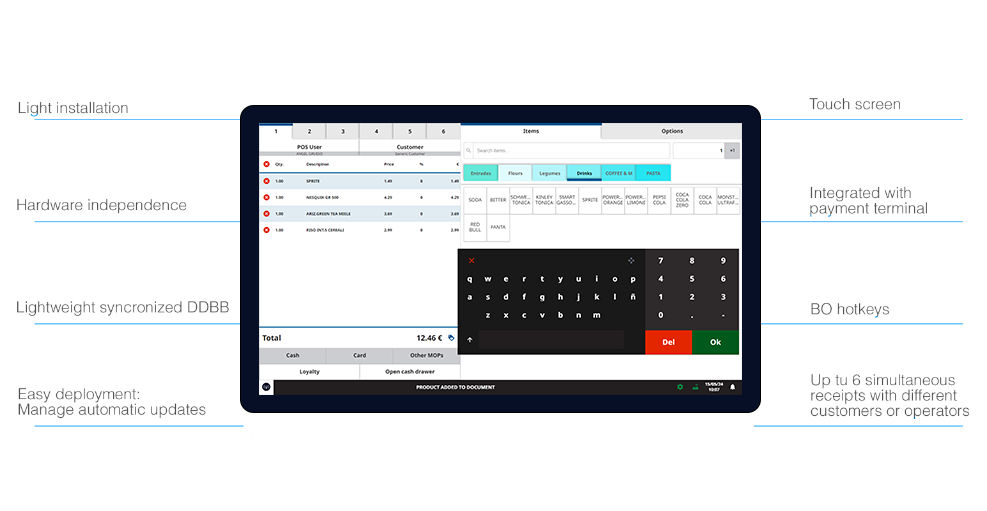
Full set of features available on Windows and Android devices with hardware independence.
Specific business panel and dynamic options provide adaptation and verticalization.
Full integration with Syntphony Commerce ERP, loyalty, promotion and private credit solutions.
General Features
Bos integration
- POS Integration with BOS.
- Access to specific functionalities from the FOS.
- Remote and centralized configuration.
- Specific configuration for each terminal and/or store.
- Manage user permissions for operations that require special control.
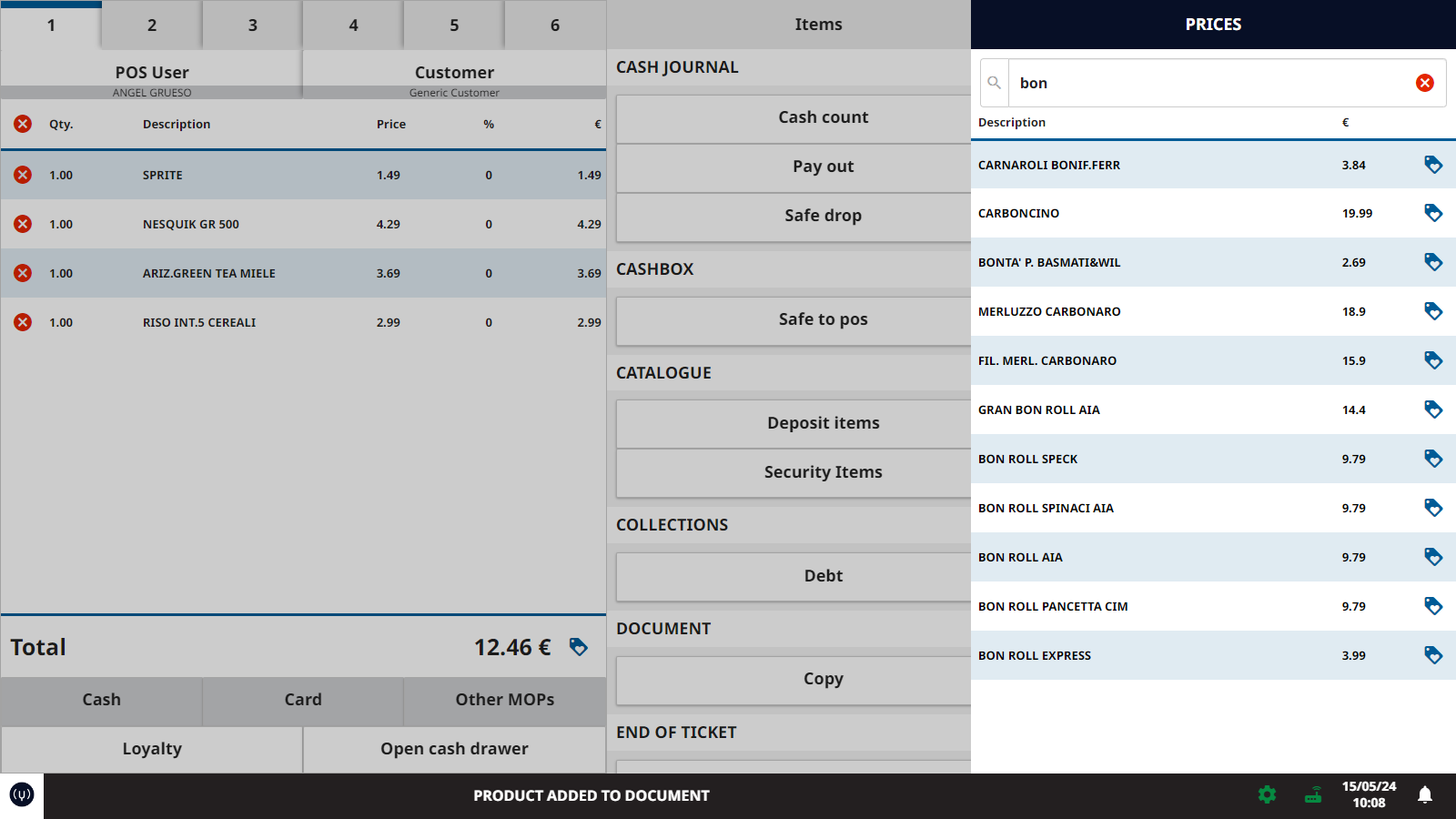
BOS Integration examples
Flexible layout
The interface of HubblePOS is responsive. Also, it adapts itself to the needs and preferences of each business, being able to organize the main elements in multiple ways.
Thanks to the high level of parametrization that the BO offers, this configuration is only one of the multiple it can be stablish on remote, in a centralized way and a different level (business, store or POS) way.
The interface of POS is responsive. Also, it adapts itself to the needs and preferences of each business, being able to organize the main elements in multiple ways.
Thanks to the high level of parametrization that the BO offers, this configuration is only one of the multiple it can be stablish on remote, in a centralized way and a different level (business, store or POS) way.
Thanks to the high level of parametrization that the BO offers, this configuration is only one of the multiple it can be stablish on remote, in a centralized way and a different level (business, store or POS) way.

Flexible layout example
Centralized functionalities
- Monitoring: Gain real-time insights into sales performance, customer behavior, and operational efficiency with comprehensive monitoring capabilities.
- Event Engine: Utilize powerful event-driven architecture to automate processes, trigger actions, and respond dynamically to changing business conditions.
- Aggregate Reporting: Access consolidated reports and analytics to drive informed decision-making and strategic planning.
- Billing: Enhance B2C operations with modern payment systems and vertical solutions tailored to your industry.
Sales PoS
Allows the management of a wide range of different types of cash register and in store checkouts. Automatic cash management, RFID and Cashierless stores.
- Mobile: enable mobile Point of Sale (PoS) solutions for on-the-go transactions and seamless customer experiences
- Attended: manage traditional attended cash registers with ease and efficiency.
- Self: Implement self-service cash registers to streamline checkout processes and reduce wait times.
- Mobile Management: permits the management of catering operating on different touchpoints (Totems, attended cash registers, mobile cash machine, app). Offers highly customized staff support functions to facilitate total accessibility and better table service, also making the customers autonomous in managing orders and payments.
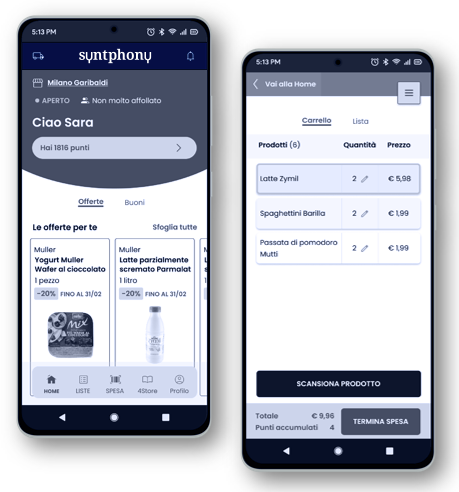
Mobile POS example
Store operations
- Store Reporting: Access detailed reports and analytics tailored to store-level performance metrics.
- Cash Management: Optimize cash handling and reconciliation processes for improved efficiency and accuracy.
E-commerce basket management
- Locker: Offer convenient locker pickup options for online orders, enhancing customer convenience and satisfaction.
- Click&Collect: Streamline order fulfillment with click-and-collect solutions that bridge the gap between online and offline shopping experiences.
- Home Delivery: Provide seamless home delivery services to meet the evolving needs of modern consumers.
Functionalities
Functionality
Configuration from BOS
Description
Available offline
Sales
Hot keys to receipts
6 simultaneous receipts customer and operator independent

Operator change
Default operator
Customer change
Default customer
Cancel line
Enabled or disabled
Enter amount
Scan item
Code reading in keyboard input mode
PLU's keyboard
Name, color or customized image
20 keys per group expandable to N
Access to PLU's groups
Name, color or customized image
8 groups expandable to N
Manual item code insertion
Search item by name or reference
Change item price
Enabled or disabled
Item discount
Enabled or disabled
Promoted item sale
Promotions
Configurable groups
Sale interface for combined article promotions
In progress
Quick Service Restaurant
In progress
Promoted items
It allows to know if an article is a promotion or not
Promotions calculation
It calculates promotions based on items of the receipt
Promotions application
It applies promotions benefits based on items of the receipt over the total sale amount
Open cash drawer
End of sale
Generic payment
Configurable methods
Simultaneous charging with different integrated payment method
Cash payment
Enabled or disabled
Quick access to cash payment
Card payment
Enabled or disabled
Quick access to card payment
Payment process
Select payment method
Up to 8 configurable buttons
Main currency, alternative currency, card, bank check, private credit, coupon, escape, corporative credit
Simultaneous charging with different integrated payment method
Pending charges
Available for identified customers
Other options
Change operator
Pending charges
Rebilling
Copy receipt
Cancel receipt
Article refunding
It refunds specific articles of a former sale
Tonnage
Cash desk closing
Cash desk closing by operator
It refunds specific articles of a former sale
Testing mode
Cash desk closing reprinting
cash opening
cash inflow
Cash outflow
Withdrawal to safe-deposit box
Select posting line type
Customizable functions
Up to 18 customizable buttons from backoffice
Other functionalities
Alerts
Configuration from backoffice
Global / by store / by POS / one time only / stablished periodicity / date and hour, etc.
Message bar
Alphanumeric dynamic keyboard on screen
Other configurations
Main currency configuration
Secondary currency configuration
POS viewer configuration
Cash drawer configuration
Customized print format
Parameterization
Accessible from backoffice
Traceability (logs)
Accessible from backoffice
Electronic diary
Associated services
Start up
Configuration and connection with other station devices (DOMS)
Product data, customer data and providers data import
Product support
Telephone attention and troubleshooting
Are you ready to play the retail industry like never before?
Contact us, request a demo of our products and start driving harmony to your side.